

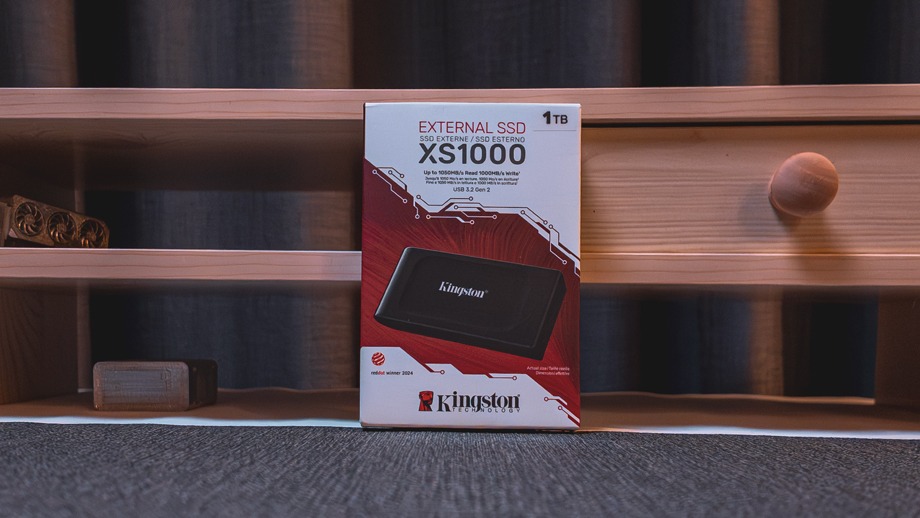
Kingston’s XS1000 is a portable SSD aimed at people who want fast, simple storage without a large drive or a high price. It’s tiny, it’s quick over USB 3.2, and it comes with a five year warranty. I ran it through CrystalDiskMark on both a USB 3.2 port and a USB 2.0 port to see how it holds up in each.

Design and Build
The XS1000 measures 69.54 x 32.58 x 13.5mm and weighs 28.7g, so it disappears into a pocket. The casing mixes metal and plastic, and it comes in black or red. Kingston says it won a Red Dot Design Award in 2024.

The box includes a 12 inch USB Type C to Type A cable and a Type A to Type C adapter. That makes it usable with older desktops and with newer laptops and phones without buying anything extra. Kingston says it works with most operating systems, our further confirmation via testing shows it also works with cameras, Nintendo Switch and several other hand held devices. So this is essentially a jack of all tools.
There’s no IP rating, so it isn’t built for rough outdoor use. Kingston’s own XS2000 adds IP55 protection and a rubber sleeve for that. The XS1000 is a drive for bags and desks.
Specifications
- Interface: USB 3.2 Gen 2 (10Gbps)
- Rated speeds: up to 1,050MB/s read, 1,000MB/s write
- Capacities: 1TB and 2TB
- Warranty: limited 5 year warranty with free technical support
- Operating temperature: 0°C to 40°C

Performance
USB 3.0

I tested the 1TB model (it shows as 954GiB in Windows) using CrystalDiskMark with three passes and a 1GiB test size.
The headline sequential result of 1,045MB/s read is almost exactly Kingston’s 1,050MB/s claim. Sequential write reached 964MB/s against a 1,000MB/s rating, which is about 96% of the claim. That’s a good result, and it also sits close to the ceiling of a 10Gbps connection, so there’s little left for the drive to give.
With a single queue (Q1T1) sequential speeds dropped to about 966MB/s read and 893MB/s write. That’s still very fast, and it’s closer to what you’ll see when copying a single big file.
The 4K random numbers are lower, as they are on any external SSD. At a queue depth of 32, the drive managed 185MB/s read and 182MB/s write. Single queue 4K read was 25.73MB/s, though single queue 4K write was a much healthier 78.57MB/s. Random performance matters if you run apps or games directly from the drive, but external SSDs generally aren’t judged on it. For moving, backing up and editing from large files, the sequential numbers are what count, and they’re excellent.
USB 2.0

I also plugged the drive into a USB 2.0 connection to see what happens with an older port.
The drive works, but the port is the bottleneck. Sequential speeds fell to around 44MB/s read and 40MB/s write, which is roughly 24 times slower than on USB 3.2. That’s typical of USB 2.0, which tops out at 480Mbps in theory and delivers a fraction of that in practice. Random 4K performance dropped to between 14 and 19MB/s.
This isn’t a flaw in the XS1000, but it’s worth knowing. Plug it into an old port and a 100GB copy that takes under two minutes on USB 3.2 would take well over half an hour. The drive does fall back gracefully and stays fully usable, so it’s fine for light file transfers on legacy hardware. To get what you paid for, use a USB 3.2 Gen 2 port, ideally a Type C one.
Who Is It For?
The XS1000 suits backups, photo and video libraries, moving large files between machines, and carrying a game or media library. At around 1GB/s, it handles 4K video footage comfortably for casual creators and students.
If you need more than that, look at the XS2000. It uses USB 3.2 Gen 2×2 and is rated at 2,000MB/s, but it needs a compatible Gen 2×2 port to reach those speeds. For most people the XS1000 is plenty, because many laptops and desktops only offer 10Gbps ports anyway.
Verdict
The XS1000 does what Kingston says it does. It reached 1,045MB/s read and 964MB/s write on USB 3.2, essentially matching its rated speeds. It also falls back to USB 2.0 without trouble, although only at around 40MB/s. The tiny, light body, included cable and adapter, broad compatibility and five year warranty make it easy to recommend as an everyday external drive. Its weak points are the lack of any dust or water protection and its modest random 4K read speed. Neither matters much for the backup and transfer work it’s designed for.